
- Simple Ways To Protect Your Money
- Scam #1: The Grandparent Emergency Call
- Scam #2: The Medicare and Social Security Call
- Scam #3: The Fake Tech Support Call
- Frequently Asked Questions
- Q1: What should I do if I already gave my bank details to a scammer?
- Q2: Can the government really call me about my Aadhaar or Social Security?
- Q3: How can I block scam calls on my phone?
- Q4: My grandson called asking for money. How do I know if it’s real?
- Q5: Is it safe to click links sent by SMS or WhatsApp?
Simple Ways To Protect Your Money
Scammers call seniors every single day.
In 2026, phone scams are the #1 way criminals steal money from people over 65.
But you can stay 100% safe. You just need to know the 3 main scams.
Let’s learn them together. It’s very easy.
Why Do Scammers Call Seniors?
Scammers target seniors for 3 reasons.
- You Are Kind: You like to help people on the phone.
- You Have Savings: You worked hard for your money.
- You Live Alone: You may feel lonely and talk longer.
Now they use AI voices and fake phone numbers. But the tricks are the same.
Scam #1: The Grandparent Emergency Call
They say “Keep it a secret”
They ask for gift cards, Zelle, or wire transfer
They sound very scared and urgent
They won’t answer personal questions
What To Do Now
Step 1: Hang up the phone.
Step 2: Call your grandchild on their real cell number.
Step 3: Ask a secret question. Example: “What is our dog’s name?”
Real family will never ask for gift cards in an emergency.
Scam #2: The Medicare and Social Security Call
How The Scam Works
“Hello, this is Social Security. Your SSN is blocked. Your benefits will stop in 24 hours.”
“Give me your Medicare number and bank details to fix it now.”
They sound official. Your phone may even show “SSA.gov”.
Warning Signs
They threaten you with jail or losing benefits
They ask for SSN, Medicare number, or bank info
They ask you to pay with gift cards
They call you first
What To Do Now
Step 1: Hang up immediately.
Step 2: Remember this rule: Medicare and Social Security NEVER call you.
Step 3: They only send letters by mail.
If you are worried, call them yourself: 1-800-772-1213
Scam #3: The Fake Tech Support Call
How The Scam Works
“Hello, this is Microsoft. We found a virus on your computer.”
“Let me connect to your computer and fix it for you.”
Or you see a pop-up: “Call this number now. Your computer is infected.”
Warning Signs
Microsoft, Apple, Google will NEVER call you
They ask to control your computer with AnyDesk
They ask for payment in gift cards
Pop-ups with loud alarms
What To Do Now
Step 1: Hang up the phone.
Step 2: Close the pop-up. Don’t click anything.
Step 3: If you are worried, ask your son, daughter, or grandchild for help.
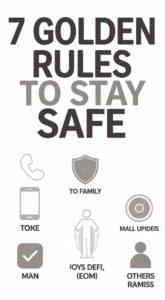
7 Simple Rules To Stay Safe From All Scams
Print this and keep it near your phone.
Slow Down: Scammers rush you. Take your time.
Hang Up: It is okay to hang up. You are safe.
Don’t Trust Caller ID: Scammers can fake any number.
No Gift Cards: Real companies never ask for gift cards.
No Personal Info: Never give SSN, Bank, or OTP on phone.
Talk To Family: Tell your kids about any strange call.
Report It: Go to reportfraud.ftc.gov to report the scam.
What If You Already Sent Money?
Don’t feel bad. It can happen to anyone.
- Call your bank right away. Tell them what happened.
- Change your passwords if you gave computer access.
- Report the scam at ftc.gov. This helps stop the criminals.
Final Safety Tip
If a call sounds urgent, it is a scam.
Real companies and real family will give you time to think.
Please share this article with your friends and family. One share can save $10,000.
Stay safe. Stay smart. ❤️
Frequently Asked Questions
Q1: What should I do if I already gave my bank details to a scammer?
Don’t panic. Immediately call your bank and block your card. Then call 1930 Cyber Crime Helpline in India or FTC in USA. Change all your passwords and tell your family about what happened.
Q2: Can the government really call me about my Aadhaar or Social Security?
No. Real government agencies like IRS, RBI, or Aadhaar will NEVER call you asking for OTP, bank details, or money. They only send official letters. If someone calls and asks for money, it’s 100% a scam. Hang up immediately.
Q3: How can I block scam calls on my phone?
For Android: Use Truecaller app or go to Phone app > Settings > Block Spam.
For iPhone: Go to Settings > Phone > Silence Unknown Callers.
In India: Register for DND by calling 1909.
Q4: My grandson called asking for money. How do I know if it’s real?
Hang up and call him back on his known number. Ask a secret question only he knows like “What is our pet dog’s name?”. Scammers won’t know the answer. Always verify first before sending any money.
Q5: Is it safe to click links sent by SMS or WhatsApp?
No. Never click links from unknown numbers. Banks and government never send payment links by SMS or WhatsApp. If you click, your phone can get a virus and your money can be stolen.
[…] *Also Read*: `3 Phone Scams Targeting Seniors in 2026` […]